
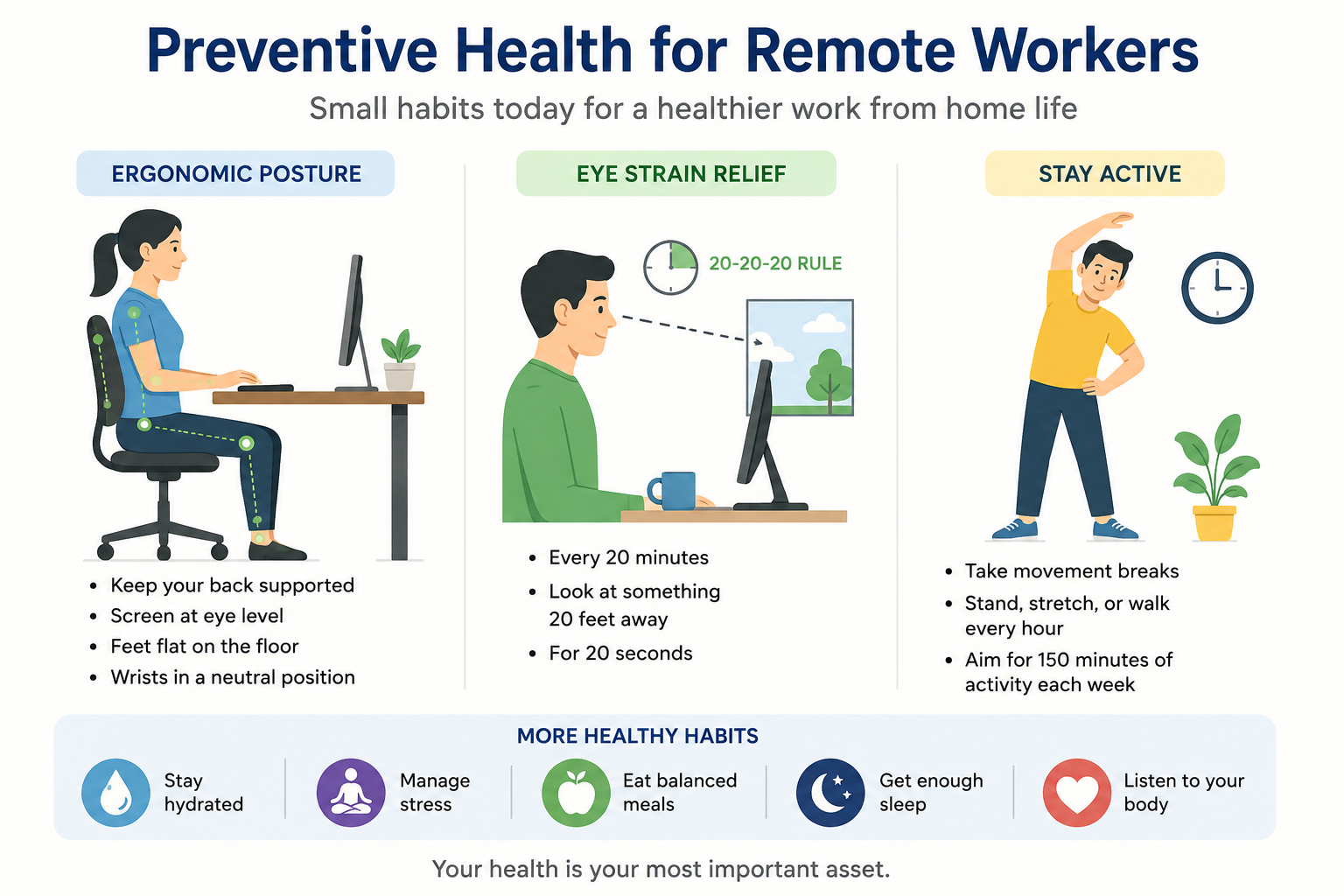

Working from home offers flexibility, but spending long hours at a desk can create health problems that develop gradually. Neck stiffness, back pain, tired eyes, headaches, and too little physical activity can become part of your daily routine before you realize they’re connected to your work setup.
Preventive health for remote workers isn’t about making your home office perfect. It’s about creating simple habits that reduce physical strain, protect your eyes, and keep your body moving throughout the workday.
Why Remote Work Can Affect Your Health
Remote workers often spend several consecutive hours sitting in front of a computer. Unlike traditional workplaces, there may be fewer natural opportunities to walk between meetings, change workstations, or take movement breaks.
Common problems include:
- Neck and shoulder discomfort
- Lower-back pain
- Wrist and hand strain
- Eye fatigue
- Headaches
- Poor posture
- Reduced physical activity
- Muscle stiffness
- Weight gain associated with prolonged inactivity
The good news is that many of these problems can be addressed through changes to your workspace and daily routine.
1. Set Up an Ergonomic Workstation
Your workstation should allow you to work without constantly bending your neck, reaching forward, or twisting your body.
Keep Your Screen at a Comfortable Height
Position your monitor so that the top of the screen is approximately at or slightly below eye level. The screen should generally be about an arm’s length away.
If you work primarily from a laptop, consider using a laptop stand with a separate keyboard and mouse.
Support Your Back
Choose a chair that supports your lower back. Keep your feet comfortably supported on the floor or use a footrest if necessary.
Try to maintain a relaxed, neutral posture rather than forcing yourself to sit rigidly upright all day.
Position Your Keyboard and Mouse
Keep your keyboard and mouse close enough that your elbows can remain near your sides. Your wrists should stay relatively neutral rather than bent upward or sideways.
2. Don’t Ignore Neck and Shoulder Pain
Neck and shoulder discomfort is common when working on laptops or poorly positioned monitors.
You can reduce strain by:
- Keeping your screen at an appropriate height
- Relaxing your shoulders
- Avoiding prolonged phone cradling between your ear and shoulder
- Changing position regularly
- Taking brief movement breaks
If pain persists, becomes severe, or is associated with numbness or weakness, consult a healthcare professional.
3. Protect Your Eyes From Screen Strain
Long periods of screen use can cause digital eye strain.
Symptoms may include:
- Dry or irritated eyes
- Blurred vision
- Difficulty focusing
- Headaches
- Increased sensitivity to light
- Tired eyes
Try the 20-20-20 Rule
A simple approach is to periodically look away from your screen and focus on something about 20 feet away for 20 seconds.
Also remember to blink regularly, particularly when concentrating on a screen.
4. Improve Your Lighting
Poor lighting can make screen work more uncomfortable.
Avoid positioning your monitor directly in front of a bright window or beneath harsh glare. Adjust blinds, curtains, or room lighting to reduce reflections.
Your screen should be bright enough to read comfortably without appearing dramatically brighter than the surrounding room.
5. Take Regular Movement Breaks
One of the biggest challenges of remote work is prolonged sitting.
You don’t need to turn every break into a workout. Simply standing up and moving around regularly can help interrupt long periods of inactivity.
Try:
- Walking while taking phone calls
- Standing during short meetings
- Stretching between tasks
- Walking around your home every hour
- Doing a few bodyweight movements during longer breaks
The goal is to break up prolonged sitting throughout the day.
6. Build Exercise Into Your Schedule
Movement breaks are valuable, but they shouldn’t completely replace regular exercise.
Aim for a combination of:
- Aerobic activity, such as brisk walking or cycling
- Strength training
- Flexibility or mobility exercises
Choose activities that fit your schedule and fitness level. Consistency matters more than having a complicated workout routine.
7. Pay Attention to Wrist and Hand Discomfort
Repeated keyboard and mouse use can contribute to discomfort in the hands and wrists.
Consider:
- Keeping your wrists in a neutral position
- Avoiding excessive force when typing
- Adjusting your mouse sensitivity
- Taking regular breaks from repetitive movements
- Alternating tasks when possible
Persistent pain, tingling, numbness, or weakness should be assessed by a healthcare professional.
8. Avoid Working From the Sofa or Bed All Day
Working from a sofa or bed may feel comfortable initially, but these positions often encourage awkward neck, back, and wrist positions.
Whenever possible, create a dedicated work area with:
- A stable desk
- An adjustable or supportive chair
- Proper screen positioning
- Adequate lighting
- Enough space to move comfortably
Your workstation doesn’t have to be expensive—it just needs to support a comfortable working position.
9. Schedule Breaks Instead of Waiting for Pain
Many remote workers take a break only after their back hurts or their eyes become exhausted.
Instead, make breaks proactive.
For example:
Work → stand → walk → stretch → return to work
You can use calendar reminders, timers, or natural transitions such as finishing a meeting as cues to move.
10. Separate Work From Personal Time
Remote work can blur the boundary between professional and personal life.
Working late into the evening may reduce opportunities for physical activity, relaxation, and adequate sleep.
Where possible:
- Establish consistent working hours.
- Take a proper lunch break.
- Step away from your workstation after work.
- Avoid routinely answering work messages late at night.
- Create a transition ritual, such as taking a short walk after finishing work.
Healthy boundaries support both physical and mental well-being.
A Simple Remote-Work Health Routine
You don’t need to completely redesign your day. Start with a few practical habits:
| Part of the Day | Healthy Habit |
|---|---|
| Before work | Set up your chair and screen comfortably |
| Every hour | Stand and move for a few minutes |
| During screen work | Blink regularly and look away periodically |
| Lunch | Step away from your workstation |
| Afternoon | Take a short walk or mobility break |
| After work | Shut down your workstation and move |
| Evening | Prioritize relaxation and adequate sleep |
When Should You See a Doctor?
Don’t assume every ache or symptom is simply an ergonomic problem.
Consider seeking medical advice if you experience:
- Persistent or worsening back or neck pain
- Numbness or tingling
- Muscle weakness
- Persistent headaches
- Ongoing vision changes
- Significant or unexplained fatigue
- Pain that interferes with normal activities
Sudden severe symptoms, significant weakness, loss of coordination, chest pain, or difficulty breathing require urgent medical attention.
Final Thoughts
Remote work doesn’t have to mean sacrificing your physical health. Small adjustments—raising your screen, supporting your back, reducing glare, taking regular movement breaks, and exercising consistently—can make a meaningful difference.
The most effective approach is prevention. Don’t wait until pain, eye strain, or inactivity becomes a daily problem. Build movement, ergonomic awareness, and regular breaks into your work routine from the beginning.
A healthier home-office routine can help you stay comfortable, productive, and physically active while working remotely.